

How to Manage Inventory Across Multiple Channels Without Overselling
Overselling on one channel because another sold your last unit is one of the most damaging mistakes a multichannel seller can make. Here is how to prevent it.
The core problem with multichannel inventory
When you sell on Amazon, eBay, and Shopify at the same time, your stock is shared — but each platform shows it independently. If you have 3 units of a product and a customer buys 2 on Amazon, those 2 units need to disappear from eBay and Shopify within seconds. If they don't, you risk selling the same item twice.
This is the overselling problem. And for sellers managing stock manually — or through platforms that update slowly — it is not a matter of if it will happen. It is a matter of when.
 Multichannel inventory management means one stock pool shared across all platforms — with every sale updating every channel instantly.
Why manual stock management breaks at scale
Most sellers start multichannel selling by updating stock counts manually. You sell on Amazon, you log into eBay and reduce the quantity. You sell on eBay, you reduce it in Shopify.
This approach has three fundamental problems:
Speed — There is a window between the sale and the manual update. If a second customer buys during that window on another channel, you have oversold.
Human error — Manual entry introduces mistakes. Wrong quantities, forgotten channels, delayed updates. At 50 SKUs this is manageable. At 500 it is not.
Scalability — Every new channel you add multiplies the update workload. Sellers who want to expand to TikTok Shop, ManoMano, or B&Q cannot reasonably do so while managing stock manually.
What real-time inventory sync looks like
A proper inventory sync system pushes a stock update to every connected channel the moment a sale is made — on any channel.
The logic works in a closed loop:
- A sale is made on Amazon for 1 unit of SKU-123
- Your central stock count for SKU-123 drops from 10 to 9
- Within seconds, that updated quantity (9) is pushed to eBay, Shopify, and every other connected channel
- All channels now show the correct available quantity
This happens automatically, without manual intervention, and at a speed that prevents the overselling window from being exploited.
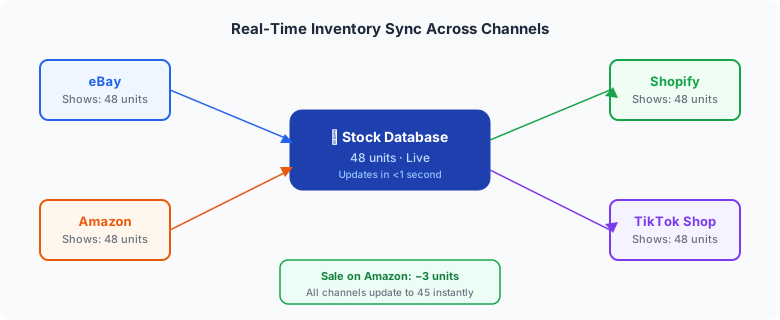 A sale on any one channel triggers an instant stock update across every other connected channel — the overselling window closes to zero.
Stock quantity rules: an additional layer of protection
Beyond basic sync, more sophisticated operations use stock quantity rules to further protect themselves.
A stock quantity rule caps the quantity displayed on any channel, regardless of how many units you actually hold. For example:
- You hold 200 units of a product
- Without a cap, Amazon would show "200 available"
- With a cap set to 7, Amazon shows 7 — even though you have 200
This protects you from:
- Bulk-buy risk — A single buyer clearing your entire stock on one channel
- Perception issues — Large quantities can sometimes signal slow-moving stock or appear untrustworthy for premium products
- Competitor visibility — Publishing exact stock counts can reveal information about your supply chain
Setting up inventory sync: what to look for
When evaluating inventory management software for multichannel selling, look for:
Real-time updates — Not batched hourly updates. The sync needs to happen within seconds of a sale.
Bidirectional sync — Changes should flow both ways. If you manually adjust stock in your warehouse system, that change should push to all channels automatically.
Centrally managed stock — Your stock count should live in one place, not in each channel separately.
Stock quantity rules — The ability to cap quantities per channel gives you control beyond basic sync.
Audit trail — You need to see a history of stock changes: when they happened, what triggered them, and what the result was.
The bottom line
Overselling is avoidable. The sellers who suffer from it most are those managing stock manually or relying on software that updates slowly. Real-time inventory sync eliminates the problem at the source.
If you are selling on more than one channel and still managing stock manually, the question is not whether you will oversell — it is how much damage that overselling will do before you address it.
Adlixor Commerce includes real-time inventory sync with stock quantity rules as standard. See how inventory sync works →
Ready to simplify your multichannel operations?
Start your 14-day free trial with Adlixor Presence — no credit card required.