

Sell on Amazon and eBay at the Same Time: A Practical Guide for UK Sellers
Running Amazon and eBay simultaneously is one of the most effective ways to grow your ecommerce revenue. Here is exactly how to do it without creating double the work.
Why Amazon and eBay together make sense
Amazon and eBay are the two largest online marketplaces in the UK. Together they account for the majority of online marketplace shopping. Selling on both gives you access to two distinct customer bases, and the incremental cost of being on both — once you have the right systems in place — is low.
But managing both channels manually is where sellers run into trouble. Different listing formats. Different order workflows. Different stock levels to maintain. Different customer expectations.
This guide covers how to run both channels efficiently, and where the real operational risks sit.
 Running Amazon and eBay in parallel requires a unified approach to listings, stock, and fulfilment.
Understanding the differences
Amazon and eBay are fundamentally different platforms, and treating them identically will cost you.
Amazon prioritises the Buy Box and seller performance metrics heavily. Your account health — tracked through order defect rate, late shipment rate, and pre-fulfilment cancel rate — directly determines your visibility. One bad week can affect your rankings for months.
eBay gives sellers more control over listings and is generally more forgiving with variation. Feedback matters, but the consequences of a poor feedback week are usually less severe than a degraded Amazon account health score.
Listing formats differ — Amazon listings are product-centric (multiple sellers on one listing). eBay listings are seller-centric (you own your listing entirely). This means creating an eBay listing requires more effort per product but gives you more control over presentation.
The stock problem: where most dual-channel sellers struggle
The most dangerous operational risk when selling on both Amazon and eBay simultaneously is inventory conflict.
You have 5 units of a product. 3 sell on Amazon. You now have 2. If eBay still shows 5 available, you are at risk of overselling.
Without automated inventory sync, this scenario plays out dozens of times a day for active sellers. And the consequences on Amazon — an oversold order, a cancellation, a defect on your account — can affect your seller standing for 60 days.
The solution is a centralised inventory system that pushes updated stock counts to both platforms the moment a sale is made on either.
Setting up your listings efficiently
Creating the same listing twice — once for Amazon and once for eBay — is the obvious approach. It is also the one that becomes unmanageable at scale.
A better approach is to create your catalogue once and publish to both platforms from the same data. This requires a multichannel listing tool, but it pays for itself quickly when you are managing 100+ SKUs.
When building your catalogue for dual-channel publishing, think carefully about:
Titles — Amazon titles follow specific formatting guidelines (capitalisation, keyword density). eBay titles have fewer rules. A single title will not serve both channels equally well. The best systems let you write channel-specific titles from a shared product base.
Images — Both platforms have minimum image requirements. Amazon requires white backgrounds for the main image. eBay does not. Use your Amazon-compliant images on both channels to simplify the process.
Pricing — You may want different prices on Amazon vs eBay to account for different fee structures and customer expectations. Channel-specific pricing rules let you manage this from a single control point.
Managing orders from both channels
Once sales start coming in from both Amazon and eBay, you need a reliable process for fulfilment. The worst thing you can do is work from two separate seller panels simultaneously.
A unified order management view pulls orders from both channels into a single queue. You see all orders, from all channels, in one place — with the same fulfilment workflow regardless of where the sale came from.
This matters more than it sounds. When a packer is working through a pick wave, they should not need to know or care whether an order came from Amazon or eBay. The system should present the work clearly, and the despatch data should feed back to the right channel automatically.
Account health: the metric that ties everything together
For Amazon especially, account health is the operational KPI that everything else feeds into. Late shipments, cancellations, A-to-Z claims — these all accumulate over a 60-day rolling window.
To protect your account health when managing both channels:
- Despatch all orders within your stated handling time
- Update tracking numbers promptly
- Do not cancel orders due to stock issues — this is the highest-impact account health event you can avoid
The best protection against cancellations due to stock issues is the inventory sync point above. Fix the stock problem and you eliminate one of the most damaging account health risks automatically.
The practical setup
For most dual-channel sellers, the practical setup looks like this:
- Centralised product catalogue — All product data lives in one place, published to both Amazon and eBay
- Real-time inventory sync — Stock updates flow to both channels the moment a sale is made on either
- Unified order management — All orders from both channels appear in one queue
- Channel-specific rules — Pricing, quantity caps, and listing variations are set per channel from a central control point
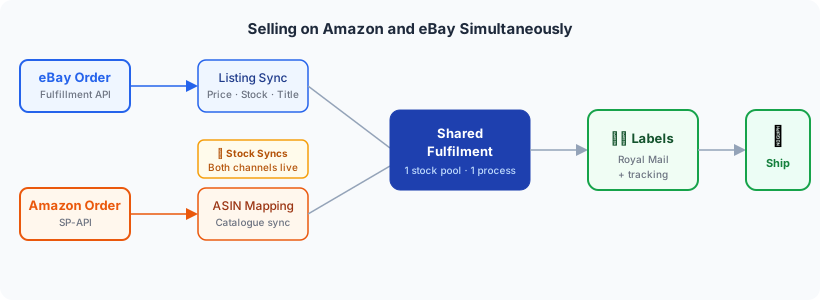 Orders from both marketplaces merge into a single fulfilment flow — one stock pool, one label queue, tracking returned to each channel automatically.
This setup is what Adlixor Presence and Commerce are built for. See how multichannel listing management works →
Ready to simplify your multichannel operations?
Start your 14-day free trial with Adlixor Presence — no credit card required.